


.png)


Here is the **updated Webflow-ready body HTML** with the new checklist image URL included. ```html
How to Make Your Resume ATS-Friendly and Avoid Getting Screened Out
You can have the right experience, a solid work history, and real qualifications, but still lose the opportunity before a hiring manager ever sees your resume. That is one of the most frustrating parts of modern job applications.
Many employers use applicant tracking systems, often called ATS, to collect, organize, scan, and rank resumes before a person reviews them. These systems are not looking for clever design, vague career summaries, or creative formatting. They are trying to identify whether your resume matches the role.
That means your resume has two jobs. It needs to be readable by screening software and persuasive to a human reviewer.
This guide shows you how to make your resume ATS-friendly without making it sound robotic. You will learn how resume screening works, what causes qualified candidates to get filtered out, and how to format, write, and tailor your resume so your qualifications are easier to find.
What it means when your resume gets rejected by “robots”
When people say their resume was rejected by “robots,” they usually mean their application was filtered, ranked low, or never surfaced clearly inside an employer’s applicant tracking system. The software may not literally reject you on its own, but it can influence whether your resume is easy for recruiters to find and evaluate.
This usually happens for one of three reasons: your resume does not match the job posting closely enough, the formatting is hard for the system to read, or your strongest qualifications are buried in unclear language.
The goal is not to trick the system. The goal is to make your resume easy to parse, search, and connect to the job you want.
How applicant tracking systems read resumes
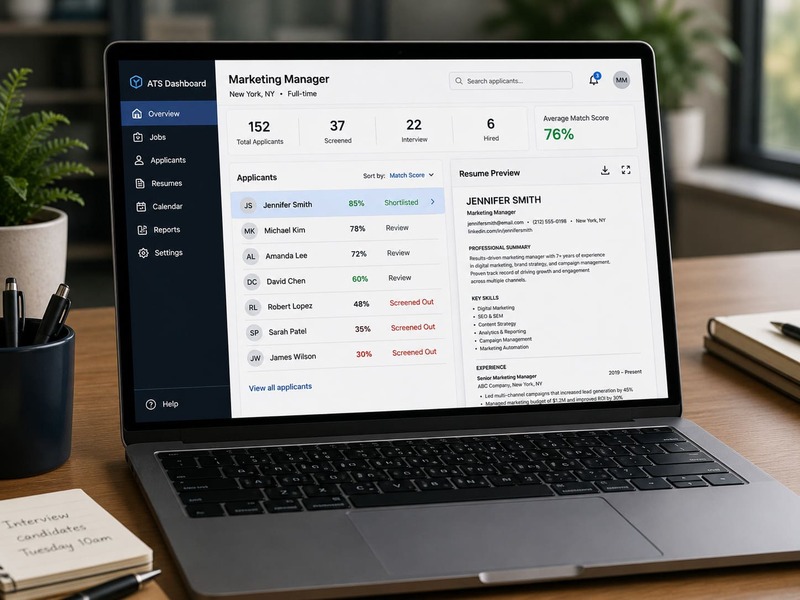
Applicant tracking systems help employers manage large numbers of applications. When you upload your resume, the system may pull out details such as your name, contact information, work history, education, skills, job titles, dates, and certifications. Recruiters can then search, sort, or filter applications based on the role’s requirements.
This is where structure matters. If your resume uses complex columns, unusual fonts, graphics, icons, text boxes, or vague section labels, the system may not read the information correctly. A resume can look impressive to you but still be difficult for software to interpret.
ATS screening also depends on relevance. A resume that uses the same kind of language as the job posting is easier to match with the role. That does not mean copying the job description. It means describing your real experience in terms the employer already recognizes.
Why qualified candidates still get screened out
Qualified candidates often get missed because their resumes are written for a general audience instead of a specific job. If your resume says you are “hardworking,” “detail-oriented,” or “experienced in fast-paced environments,” it may sound positive, but it does not give the system or recruiter enough evidence to connect you to the role.
Another problem is wording mismatch. Your experience may be relevant, but your resume may describe it differently from the employer. For example, a job posting may ask for “customer relationship management,” while your resume only says “client follow-up.” Those may describe similar work, but the missing phrase can weaken the match.
SHRM gives a similar warning: even related phrases can be treated differently when screening tools are looking for exact wording from the job description.
Formatting can also hide important details. If your skills are inside graphics, columns, headers, footers, or text boxes, they may not parse correctly. The result is frustrating: you may be qualified, but your resume does not make that qualification obvious enough.
A strong ATS-friendly resume removes those barriers. It translates your experience into clear, job-relevant language.
ATS-friendly resume formatting rules
An ATS-friendly resume should be simple, structured, and easy to scan. This does not mean it has to look plain or outdated. It means the design should support readability instead of getting in the way.
Use a clean, single-column layout for the main body of your resume. Avoid tables, text boxes, heavy graphics, decorative icons, photos, and complicated columns. These elements may look polished, but they can cause parsing errors when the system tries to pull your information into separate fields.
Use standard section headings, such as:
- Professional Summary
- Work Experience
- Education
- Skills
- Certifications
Keep your font readable and common. Good options include Arial, Calibri, Helvetica, Georgia, or Times New Roman. Use consistent spacing, clear dates, and straightforward job titles. Save the file as a .docx or PDF unless the employer gives different instructions.
Your work experience should be the strongest section. List each role with your job title, employer, location, and dates. Then use bullet points to show results, responsibilities, tools, and skills that match the job posting.
The best format is not the most creative one. It is the format that helps the system understand your resume and helps the recruiter find your strongest evidence quickly.
How to use resume keywords correctly
Resume keywords are the words and phrases an employer uses to describe the job. They often include skills, tools, credentials, job titles, industry terms, software, methods, and responsibilities. If the job posting asks for “project management,” “Salesforce,” “data analysis,” or “state licensure,” those terms matter because they help connect your resume to the role.
MIT Career Advising & Professional Development recommends incorporating relevant keywords from the job description in a reasonable way so your background is framed around the role.
Start by reading the job posting closely. Look for repeated phrases, required qualifications, preferred skills, and tools listed in the responsibilities section. Then compare those words to your actual experience.
Use keywords only when they are honest and accurate. Do not paste a long keyword list at the bottom of your resume or repeat the same phrase unnaturally. Keyword stuffing can make your resume harder to read and less credible.
A better approach is to place keywords inside real evidence:
- Instead of “Project management,” write “Managed 12 client implementation projects from kickoff through delivery.”
- Instead of “Excel,” write “Built Excel tracking reports to monitor weekly sales performance.”
- Instead of “Customer service,” write “Resolved 40+ customer support requests per day while maintaining satisfaction targets.”
The strongest keywords are attached to proof. They show not just that you know the term, but that you have used the skill in a real work setting.
What sections every ATS-friendly resume should include
An ATS-friendly resume should make your most important information easy to identify. Use clear section headings and avoid renaming common sections in a creative way. For example, use “Work Experience” instead of “Where I’ve Made an Impact.”
Most resumes should include:
- Contact information: Your name, phone number, email, city and state, and LinkedIn profile if it is current.
- Professional summary: Two to four lines that connect your background to the target role.
- Skills: A focused list of relevant tools, technical skills, industry knowledge, and role-specific strengths.
- Work experience: Your job titles, employers, dates, and achievement-focused bullet points.
- Education: Degrees, schools, and relevant training.
- Certifications: Required or valuable credentials for the role.
You do not need every possible section. You need the sections that help the employer quickly confirm you meet the role’s requirements.
Resume mistakes that confuse ATS software
Some resume mistakes make it harder for applicant tracking systems to read your information correctly. Others make it harder for recruiters to understand why you are a match. The safest approach is to keep your resume clean, direct, and focused on the job.
Avoid these common problems:
- Using tables, text boxes, images, icons, or complex columns for important information
- Putting your name, phone number, or email only in the header or footer
- Using unusual section names that do not clearly describe the content
- Listing skills without showing how you used them
- Submitting the same generic resume to every job
- Using acronyms without also spelling out the full term when needed
- Overloading your resume with keywords that do not fit your actual background
Your resume does not need tricks. It needs clean structure, accurate language, and clear evidence that your background fits the role.
How to tailor your resume for each job posting
Tailoring your resume does not mean rewriting everything from scratch. It means adjusting the most important parts of your resume so the employer can quickly see why your background fits this specific role.
Start with the job posting. Identify the required skills, repeated keywords, tools, responsibilities, credentials, and outcomes the employer cares about most. Then compare those requirements with your resume. Your strongest matching experience should be easy to find in your summary, skills section, and work experience bullets.
Focus especially on the top third of the resume. If a recruiter only reads for a few seconds, they should still understand the role you want, the experience you bring, and the most relevant skills you offer.
You can tailor your resume by:
- Updating your summary to match the target role
- Reordering your skills so the most relevant ones appear first
- Adding job-specific keywords where they accurately fit
- Rewriting bullet points to emphasize matching responsibilities
- Including measurable results when possible
A generic resume asks the employer to figure out your fit. A tailored resume does more of that work for them.
How AI resume tools can help, and where they can hurt
AI tools can help you update a resume faster, especially when you need to compare your resume with a job posting, rewrite bullet points, or find missing keywords. CareerFitter’s guide on how to use ChatGPT to write a resume can help you use AI more carefully without letting it invent or inflate your experience.
AI can also help you turn vague responsibilities into clearer, more specific statements.
The risk is that AI can make your resume sound generic if you accept every suggestion without judgment. Employers do not need a polished paragraph that could describe anyone. They need accurate evidence of what you have done, what tools you used, and what results you helped create.
Use AI as an editing assistant, not a replacement for your experience. Check every claim for accuracy. Add real numbers when you can. Keep your wording natural. Your resume should still sound like a credible summary of your work, not a collection of inflated phrases.
If you are unsure which strengths to emphasize in your resume, the Career Strengths Report can help you identify work-related strengths that may be worth highlighting when they match the job posting.
OR
CareerFitter has a Resume Updater that takes just seconds to integrate your specific career strengths for a job to create a career targeting resume.
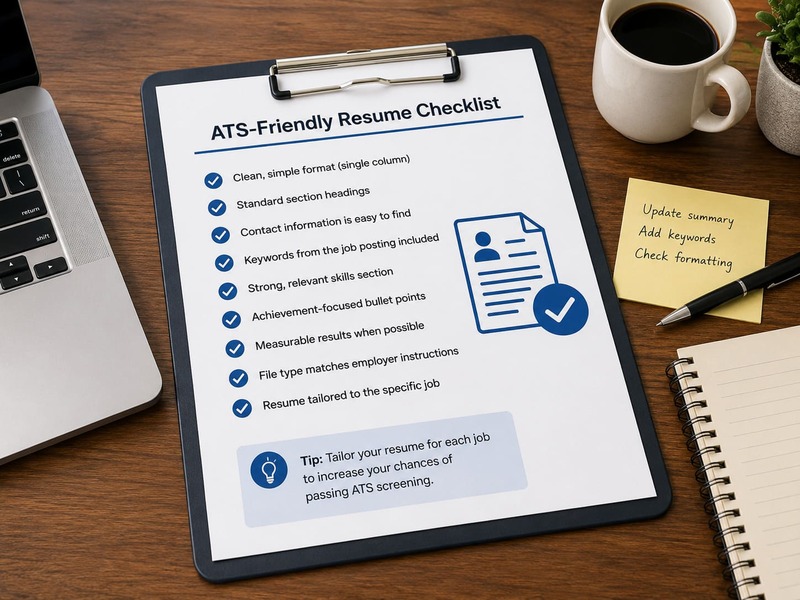
ATS resume checklist
Before you submit your resume, use this quick checklist:
- Your resume uses a clean, single-column layout
- Your contact information appears in the main body, not only in a header or footer
- Your section headings are standard and easy to recognize
- Your resume includes keywords from the job posting where they honestly fit
- Your strongest matching experience appears near the top
- Your bullet points include specific responsibilities, tools, skills, or results
- Your file type follows the employer’s instructions
- Your resume is tailored to the specific job before you apply
If your resume passes this checklist, you have reduced the most common barriers that prevent qualified candidates from being clearly understood by screening software and recruiters.
FAQ
Can an ATS reject my resume automatically?
In some hiring workflows, applicant tracking systems can help filter or rank resumes based on employer settings, required questions, keywords, or qualifications. In other cases, the ATS mainly organizes applications so recruiters can search and review them. Either way, your resume should be easy for both software and people to understand.
Should I use a PDF or Word document for an ATS resume?
Follow the instructions in the job posting first. If the employer asks for a specific file type, use that format. If no instructions are given, a .docx file is often a safe choice, and many modern systems can also read PDFs. The bigger issue is whether your resume uses clean formatting and readable text.
Do ATS systems care about resume design?
Design matters less than clarity. A highly designed resume with graphics, icons, columns, and text boxes may look impressive but can create reading problems. Use simple formatting, clear headings, consistent spacing, and strong bullet points.
How many keywords should I include?
There is no perfect number. Focus on the most important keywords from the job posting, especially required skills, tools, credentials, and responsibilities. Use them naturally inside your summary, skills section, and work experience bullets.
Can I use the same resume for every job?
You can use the same base resume, but you should tailor it before applying. Adjust your summary, skills, and bullet points to reflect the role’s most important requirements. A tailored resume makes your fit easier to see.
```





.avif)


